
index=events change=tcp_port_opened earliest=-1dRun in ShadowTrackr index=events change=tcp_port_opened:3389 earliest=-1dRun in ShadowTrackr index=cves_assets cvss_score>=7 first_seen>-1dRun in ShadowTrackr index=events change="protocol_added:TLS 1.0" earliest=-1dRun in ShadowTrackr index=events eid=198 change=p_changed earliest=-1dRun in ShadowTrackr index=events change=security_header_removed earliest=-1dRun in ShadowTrackr
change=<field>:<value>     one specific value, for example change=tcp_port_opened:3389
change=<field>            any value, for example change=san_added
change!=<field>:<value>    events that do not contain that value
Ports          tcp_port_opened, tcp_port_closed, tcp_port_changed
               udp_port_opened, udp_port_closed, udp_port_changed   (value is the port number)

Certificates   cn, san, issuer, caa_email, caa_issuer, servername, ciphersuite, protocol
DNS records    the record attribute, such as p, rua, mname or serial. Add eid= to pick the record type:
               198 DMARC, 196 DKIM, 197 SPF, 142 SOA
Websites       header, software, script, css

Certificates, DNS records and the website fields above end in _added, _removed or _changed.
For example protocol_added:TLS 1.0, san_removed:old.example.com or cn_changed.

Websites also have: security_header_removed, keyword_missing, keyword_reappeared,
keyword_changed and status_changed.
This alert will fire if a vulnerability with a CVSS score of 9 or higher is found in software on your assets. Critical vulnerabilities are quickly picked up by attackers, so patch them first.
index=cves_assets cvss_score>=9 first_seen>-1dRun in ShadowTrackr This alert will fire if the US CISA adds a vulnerability to its Known Exploited Vulnerabilities (KEV) catalog that matches software on your assets. These vulnerabilities are being exploited right now, so every match needs immediate action, and the due date CISA sets is the latest you should patch.
index=events eid=3306 level>80 earliest=-1dRun in ShadowTrackr This alert will fire if the Dutch NCSC publishes a security advisory that matches software on your assets. Advisories are issued for vulnerabilities that deserve prompt attention. The alert fires once per advisory, not once per CVE.
index=events eid=3307 level>80 earliest=-1dRun in ShadowTrackr This alert will fire if a new CVE is found on one or more of your assets. It only alerts on Critical CVEs (CVSS score 9 and above) and High CVEs (CVSS score 7 and above).
Note that there has to be an exact match on the version for the alert to fire. If ShadowTrackr has detected the software but not the version, this alert will not work.
$new_vulnerabilitiesRun in ShadowTrackr This alert will fire if Remote Desktop (3389), SSH (22), Telnet (23) or VNC (5900) opens on any of your hosts. Remote access services are one of the most common ways in for attackers, so you want to know the moment one appears. Check that it is intended, restrict it to a VPN or an allow-list, and use multi-factor authentication. Add or remove ports in the query to fit your environment.
index=events (change=tcp_port_opened:3389 OR change=tcp_port_opened:22 OR change=tcp_port_opened:23 OR change=tcp_port_opened:5900) earliest=-1dRun in ShadowTrackr This alert will fire if a database or cache port opens on one of your hosts: MySQL, PostgreSQL, SQL Server, Oracle, MongoDB, Redis, Elasticsearch or Memcached. These services should almost never be reachable from the internet, and exposed databases are a leading cause of data breaches. Close the port or put it behind a firewall or VPN.
index=events (change=tcp_port_opened:3306 OR change=tcp_port_opened:5432 OR change=tcp_port_opened:1433 OR change=tcp_port_opened:1521 OR change=tcp_port_opened:27017 OR change=tcp_port_opened:6379 OR change=tcp_port_opened:9200 OR change=tcp_port_opened:11211) earliest=-1dRun in ShadowTrackr This alert will fire if a port change on a host involves a service with a known problem, such as unencrypted logins or an insecure protocol. These are the port changes that need attention first.
index=events eid=283 earliest=-1dRun in ShadowTrackr This alert will fire every time a TCP port opens on any of your hosts. It is the strictest port alert and can be noisy on busy infrastructure, but it is the best way to keep your external attack surface exactly as intended. If it is too much, start with the remote access and database port alerts.
index=events change=tcp_port_opened earliest=-1dRun in ShadowTrackr You should strive for zero hosts with problems. If you have that, you can use this alert to let you know that a new host with a problem is found, or an existing host has developed a problem.
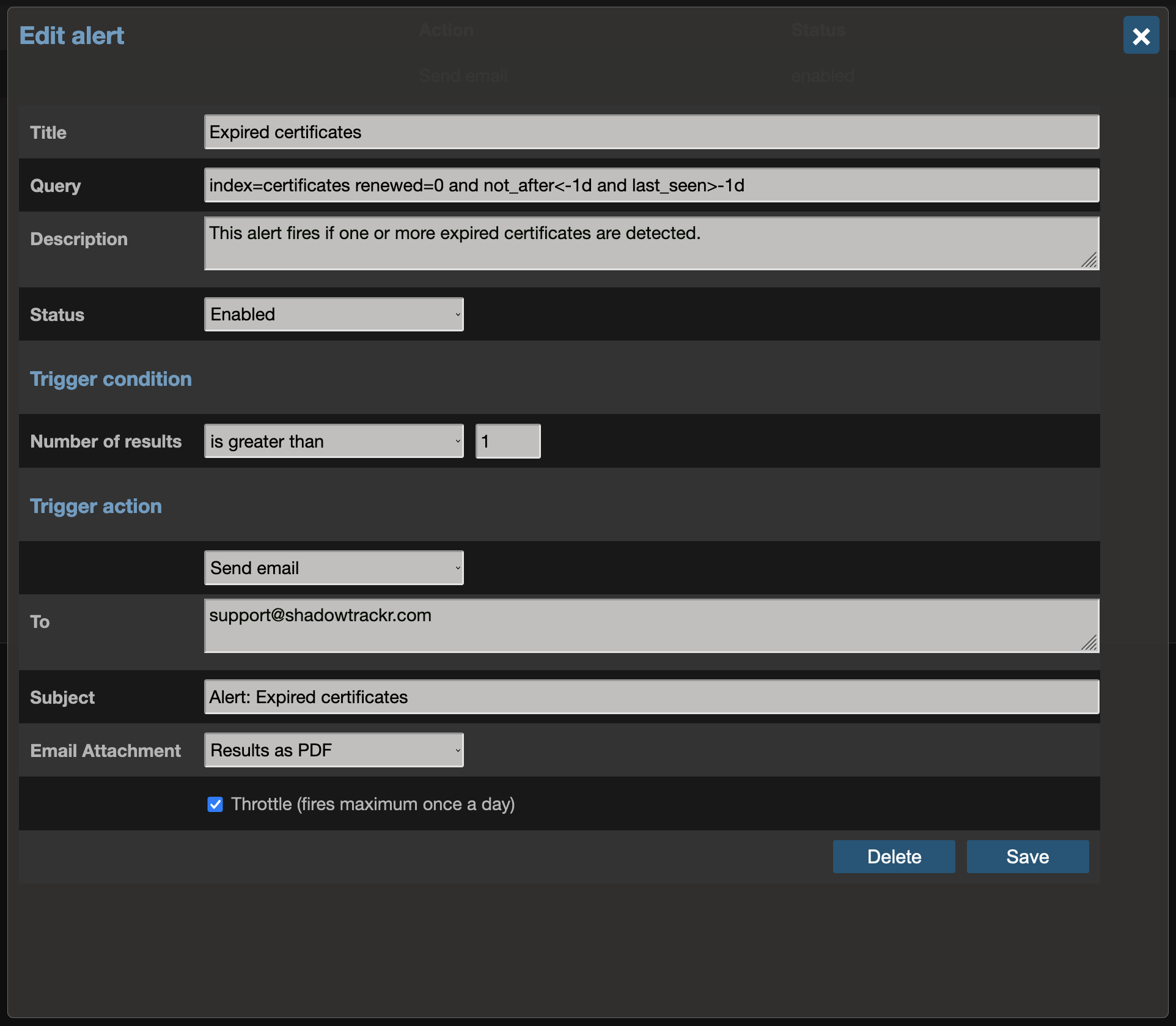
index=hosts problem=1 last_seen>-1dRun in ShadowTrackr This alert will fire if a certificate expires within 14 days and has not been renewed. An expired certificate makes browsers show a security warning instead of your website. Use it to catch renewals that silently failed. Certificates that have already expired are included.
index=certificates days<14 AND renewed=False AND last_seen>-1dRun in ShadowTrackr If you want your visitors to trust you, all your certificates should have an A grade. This alert will fire daily if you have any certificate with a lower grade.
index=certificates grade NOT IN (A, A+, A-) AND last_seen > -1dRun in ShadowTrackr This alert will fire if a server starts offering SSL 3.0, TLS 1.0 or TLS 1.1. These protocol versions are outdated and insecure, and modern guidelines require them to be switched off. A new entry usually means a configuration change or a rebuilt server that lost its hardening.
index=events (change="protocol_added:SSL 3.0" OR change="protocol_added:TLS 1.0" OR change="protocol_added:TLS 1.1") earliest=-1dRun in ShadowTrackr This alert will fire if the certificate on one of your assets is now issued by a different certificate authority. That can be a planned move, but it can also mean someone else obtained a certificate for your domain. Check who requested it.
index=events eid=1346 earliest=-1dRun in ShadowTrackr This alert will fire if names are added to the Subject Alternative Names (SAN) of a certificate on one of your assets. It helps you spot new subdomains and services that appear without anyone telling security, and certificates that cover more than they should.
index=events change=san_added earliest=-1dRun in ShadowTrackr This alert will fire when one of your domains is within three weeks of expiring, with further reminders at two weeks and one week. Renew in time: once a domain expires, someone else can register it and use it for phishing or to take over your mail. Dutch .nl domains do not publish expiry dates, so they are not covered.
index=events eid IN (1827, 1828, 1829, 1853, 1854, 1855) earliest=-1dRun in ShadowTrackr This alert will fire if the nameservers of one of your domains change at the registry. Changing nameservers is how domains are hijacked, because whoever runs the nameservers controls where your website and email go. If you did not do it, contact your registrar immediately.
index=events eid IN (1824, 1850) earliest=-1dRun in ShadowTrackr This alert will fire if one of your domains moves to a different registrar. That is normal after a planned transfer, but an unexpected transfer is a sign of domain hijacking. If you did not request it, contact your registrar immediately.
index=events eid IN (1804, 1821, 1847, 1856) earliest=-1dRun in ShadowTrackr This alert will fire if DNSSEC is switched off for one of your domains. DNSSEC protects your DNS answers against tampering. Turning it off by accident, for example during a migration, silently removes that protection.
index=events eid IN (1817, 1843) earliest=-1dRun in ShadowTrackr This alert will fire if the DKIM, SPF or DMARC record of one of your domains changes. These records protect your domain against spoofing and decide whether your mail is delivered. An unexpected change can mean a mistake, or someone preparing to send mail in your name.
index=events eid IN (196, 197, 198) earliest=-1dRun in ShadowTrackr This alert will fire if any new phishy domains are found. It should run daily.
index=events eid=3001 and created >-1dRun in ShadowTrackr This alert will fire if the content of one of your websites changes in a way that looks like defacement. Defacement is visible to your visitors and damages trust, so you want to be the first to know.
index=events eid IN (1680, 1681) earliest=-1dRun in ShadowTrackr This alert will fire if a website stops sending a security header it used to send, such as Content-Security-Policy or Strict-Transport-Security. That usually follows a deployment or a webserver change that lost its hardening.
index=events change=security_header_removed earliest=-1dRun in ShadowTrackr This alert will fire if the security grade of one of your websites changes. Use it to notice when a deployment improves or weakens your website's protection.
index=events eid=1668 earliest=-1dRun in ShadowTrackr This alert will fire if ShadowTrackr finds new domains, subdomains or hosts that may belong to you. Review them under Suggestions and add them as assets, so they are monitored too. Unknown assets are exactly where unpatched software tends to hide.
index=suggestions found>-1dRun in ShadowTrackr This alert will fire every time a new subdomain is found. It uses a list of specific event ids for all new URLs, and then filters out the suggestions and a specific domain (shadowtrackr.com in the example).
Don't forget to change "shadowtrackr.com" to your domain.
index=events eid IN (101, 114, 127, 130 , 133, 146 , 147, 150, 151, 152, 153, 191 , 600, 650, 1351, 1390, 1391, 1396, 1410, 1664) message="Discovered and added url*shadowtrackr.com" AND created > -1dRun in ShadowTrackr This alert will fire if an asset is found to be on a blacklist. A score above 80 is significant and you'll want to take action, so your visitors and clients do not get security warnings when they visit your website or send you email.
index=events eid=6 AND level>80 AND created>-1dRun in ShadowTrackr This alert will fire if one of your keywords appears on a data dump or paste site, or in the news. Use keywords such as your domain, a project name or an internal hostname to find leaked documents, source code and credentials early.
index=events eid IN (8, 10) earliest=-1dRun in ShadowTrackr This alert will fire if an email address on one of your assets turns up in a known data breach. Ask the affected users to change their passwords, and consider enforcing multi-factor authentication to protect against reused passwords.
index=events eid=3101 earliest=-1dRun in ShadowTrackr
shadowtrackr dataleak
shadowtrackr hack
shadowtrackr confidential